+49 89 89082-110



In the ever-evolving landscape of red team operations, maintaining persistent and covert communication channels is crucial for successful engagements. Recently, it has become more and more important to be aware of which process is doing what. For example, notepad.exe communicating to the Internet is weird, while it’s totally normal for chrome.exe. But chrome.exe communicating to file shares or domain controllers in the network? Strange again. This post explores how SOCKS proxies can help solve this issue while also providing defenders with the knowledge needed to detect these approaches.
What is Chisel?
While we’ve been utilizing Chisel for this kind of evasion in our Red Team engagement for a while now, threat actors increased their usage as well, resulting in more and more attention being drawn to the tool. Note that it is not to be confused with the malware family Infamous Chisel. Chisel is an Open-Source tool that enables fast TCP/UDP tunneling transported over HTTP WebSockets and secured via SSH. This Go-based tool allows establishing secure tunnels masking as web communication. What sets Chisel apart from traditional tunneling tools is its stability and low latency due to using WebSockets, and its high compatibility due to its use of the SSH implementation of SOCKS.
Inner Workings: SSH Over WebSocket Magic
At its core, Chisel wraps SSH protocol communications within WebSocket connections:
- WebSocket Transport Layer: Chisel establishes a WebSocket connection between the client and server, making the traffic appear as standard web communication to network monitoring tools.
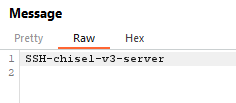
- SSH Encapsulation: Once the WebSocket connection is established, SSH protocol data is transmitted through this channel, providing encryption and authentication. This can clearly be observed by inspecting the WebSocket traffic using interception proxies such as BurpSuite. The SSH handshake is clearly visible, followed by only encrypted content:



- Traffic Forwarding: The tool supports both local and remote port forwarding. Most importantly, however, is the SOCKS5 protocol that allows forwarding TCP and UDP traffic without knowing the target system or port in advance.
Chisel acts as the SOCKS server and Red Teamers can now forward arbitrary TCP and UDP traffic to the victim’s network.
Example: How to utilize SOCKS proxies in Red Team Engagements
The first step to utilize Chisel for hidden communication is setting up the server. This is easy on Kali Linux:
This will generate a new SSH key for the server and set up a chisel server listening on port 3000 for incoming WebSocket initiation requests. While relevant in a real Red Team engagement, we won’t cover details on how to protect your server from detection – there are plenty resources out there on how to protect your C2 servers. In general, we usually have the following setup:
- Chisel, listening on port 3000 for incoming connections.
- A reverse proxy, like nginx or caddy, listening on port 443 with HTTPS that applies various blocking, filtering and protection mechanisms, and proxying incoming requests to your Chisel server, if they pass all checks.
- A cloud redirector hosted on something like AWS lambda or Azure App Services, or a CDN like Cloudflare, Azure FrontDoor or AWS CloudFront that adds a trustworthy domain and IP to your C2 infrastructure.
On your target, where you achieved code execution or malware infection one way or another, you can now deploy your chisel client and make it connect to your server. Of course, simply executing the client will be detected by most EDRs – we will get to that later.
The server component of chisel opens port 1081 on your own server, which you can then use with tools like proxychains to tunnel traffic from your chisel server (or your local machine, using SSH port forwarding) through your established SOCKS proxy:
Proxychains Configuration
Using proxychains to send traffic through the SOCKS proxy:
This enables Red Teamers to utilize tools that would either not run on the infected computer or would simply be detected by the installed EDR solution.
Excursion: SOCKS on Windows
Utilizing tools that will otherwise be blocked on the infected computer is, however, also a concern for Windows tooling. Executing your tools through the C2 framework of your choice is getting harder, and while there are still ways around, why not just execute them on a host without any EDR?
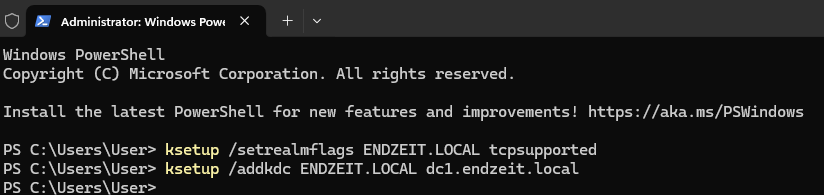
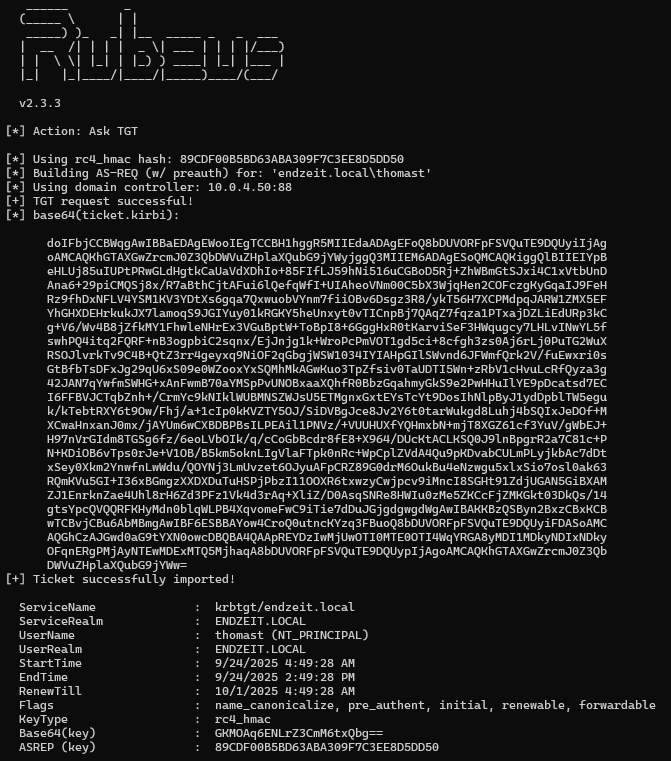
Tools such as Proxifier bring SOCKS proxies to Windows, and with a little trickery, you can even utilize Kerberos through it:
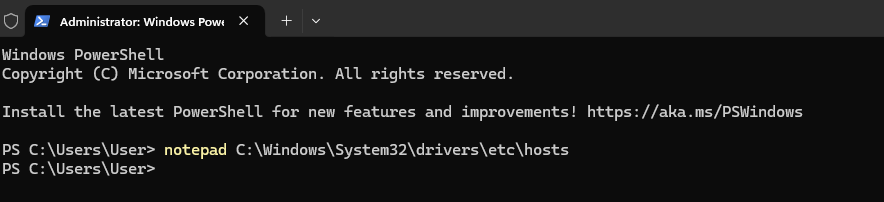
In my experience it is easiest to hard code the IP address of the domain controller in your hosts file, to avoid any issues with DNS.
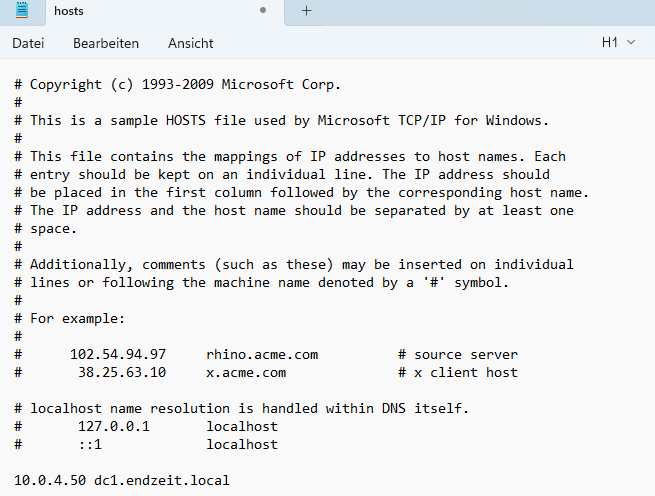
After a quick reboot, you can use your favorite Windows tools without issues.
The Final Piece of the Puzzle: DLL Sideloading
As previously foreshadowed, simply executing the chisel client on the target PC won’t cut it. This is where DLL sideloading enters the game. This technique exploits the Windows DLL search order to load malicious libraries instead of legitimate ones.
DLL sideloading or DLL hijacking occurs when a Windows application loads a malicious DLL from a directory in the DLL search order prior to the intended DLL. This happens because Windows searches for DLLs in a specific order:
- The directory containing the executable
- System directories (System32, SysWOW64)
- Windows directory
- Current working directory
- Directories in the PATH environment variable
So, if you place a legitimate and signed binary alongside a malicious DLL that exports the right functions, the binary will load your malicious DLL instead of looking for it at the right place. While there are means to protect against this sort of attack, there are plenty of binaries that don’t deploy these kinds of protection. A good source to look for potential candidates is HijackLibs.
As initially stated, you will want to utilize a binary that might not trigger any suspicion when performing your intended network actions. Choosing the right binary will be left as an exercise to the reader, and for demonstration purposes we continue our journey with jli.dll which is loaded by binaries such as jar.exe, java.exe or javaw.exe.
While we don’t go into too much detail on DLL sideloading, there are various good blog posts out there explaining this approach in due depth. For the sake of this blog, we simply assume you obtained a binary and the corresponding DLL and retrieved the necessary exports for that DLL.
Connecting the Dots: Chisel goes DLL
Finally, we need to get Chisel to become our chosen DLL. And thanks to Go, this is quite easy. We only need the fingerprint, the authentication data and the server URL of the Chisel server we previously set up. Then create a file like the following. Make sure you replace the configuration options with your data.
This file covers two important aspects:
- It generates a Chisel configuration and prepares a function to start the client with it.
- It lists all exports jli.dll needs and picks one to start the Chisel client through the previously prepared function.
Compile the code with the following command:
After that, you will have a jli.dll in your folder. Place it next to a java.exe, javaw.exe or jar.exe, and start the binary:
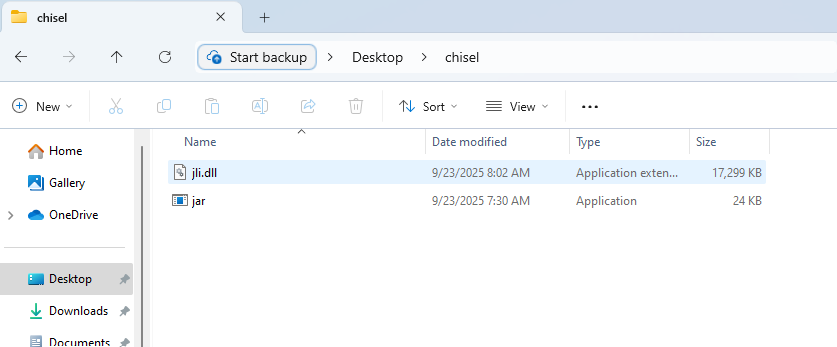
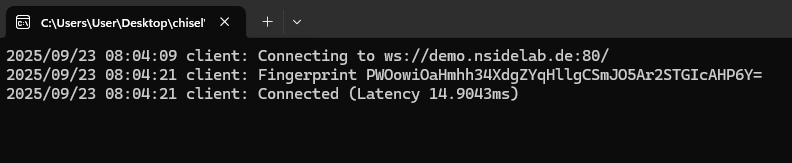
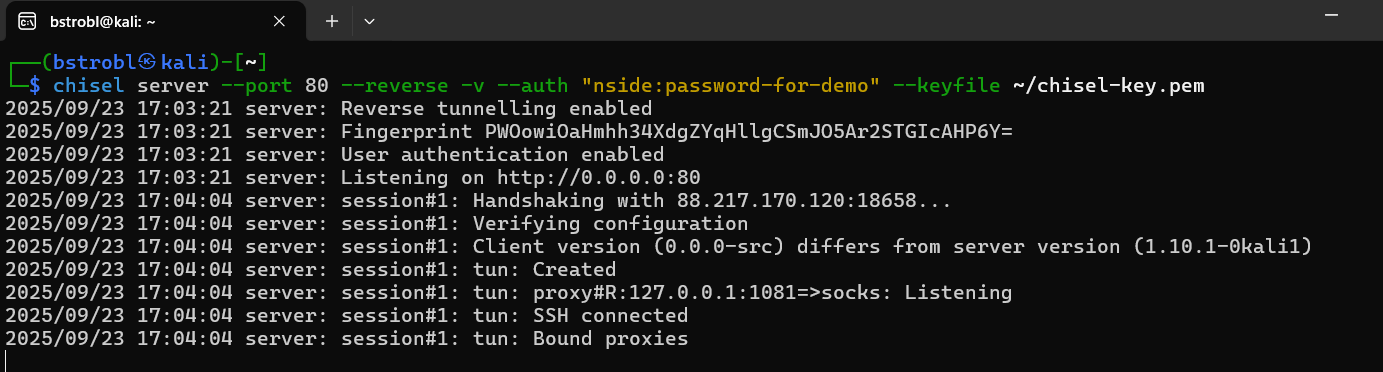
If everything worked as planned, you should now have received a connection on your Chisel server:
Detection Strategies for Blue Teams
While this method is designed to work around EDR and XDR tools, there are a couple of ways to detect it quite easily.
Network-Based Detection
Anomalous Kerberos Traffic: Monitor for processes other than lsass.exe communicating with port 88 (Kerberos) on domain controllers. Chisel tunnels carrying authentication traffic may exhibit this behavior:
Protocol Tunneling in WebSockets: Check your web traffic and make sure to investigate WebSocket communication, too. Once you look at these, SSH communication is a big red flag and can easily be spotted by its unique handshake.
Remember: These techniques should only be used in authorized penetration testing and red team exercises. Unauthorized use of these methods against systems you don’t own or have explicit permission to test is illegal and unethical.